Loading...
VS Code Plugin — Quokka.js
Quokka.js is a VS Code extension that allows you to see console output directly inside the editor and quickly identify errors as you write code.
The documentation is clear and contains many examples. I'll cover only part of the functionality to give a general idea of what the plugin does.
Documentation:
https://quokkajs.com/docs/index.html
If a file contains syntax that is not supported by the free version (for example, import statements), the plugin will not work.
To create a new Quokka file:
- Press Ctrl/Cmd + Shift + P
- Select New JavaScript File
- To start Quokka on the created file, choose Start on Current File
Keyboard Shortcuts
- Create a new JavaScript file: Cmd/Ctrl + K, J
- Create a new TypeScript file: Cmd/Ctrl + K, T
- Start Quokka in the current file: Cmd/Ctrl + K, Q
Key Features
1. Display Variable Values Directly in the Editor
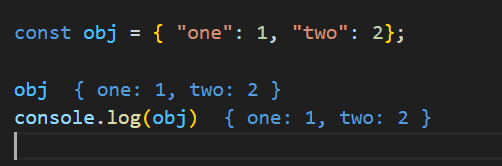
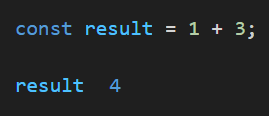
Quokka can show the current value of a variable inline, right next to the code, without requiring a console.log.
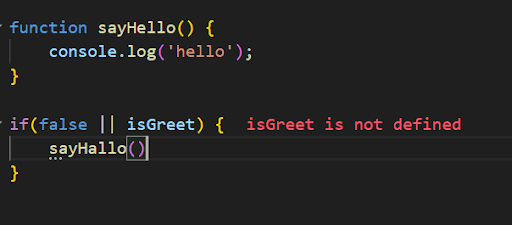
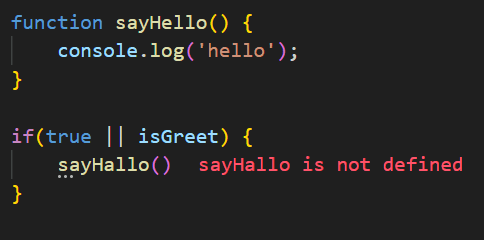
2. You get immediate feedback if you've made a typo or forgotten to define a variable.
3. You can view everything you log to the console through the Wallaby Tools extension.
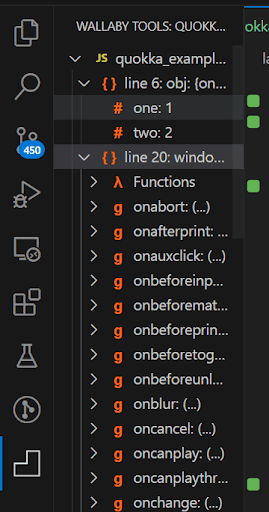
4. Navigate through the code automatically and view values in real time without logging them to the console — simply by selecting the required section of code.
Time Machine: https://quokkajs.com/docs/#debugger
5. You can share your code with others: https://quokkajs.com/docs/#debugger
The Pro version offers much more functionality. You can explore all available features on the Quokka.js website.
Quokka.js can be configured either through a global config file or locally within a project.
You can find information about configuration options and available settings here: https://quokkajs.com/docs/configuration.html